CodeChase
CodeChase is a desktop search system optimized for the Eclipse work environment.
Enables free-text search (Lucene-syntax) over content hosted on the locally accessible filesystem. Content specializations are provided for indexing and searching Java, PDF, HTML/XML, and plain-text documents.
Design intent is to enable direct searching the platform SDK source, local workspaces, free-form, and archive code collections. Indexed content can be hosted on the platform in plain files or contained within archives. CodeChase can open and read jar, zip, and tar archives, including the tgz and tbz2 variants. Search result files are opened directly in their content appropriate platform editor.
Architecture
CodeChase is implemented as:
- Search Form
- the primary interface providing query entry and result presentation
- accepts combined free-form and structured queries
- multiple search forms can be open concurrently
- accessible from the main toolbar
- Repository Configuration Form
- allows multiple content repositories to be defined and subsequently modified
- provides access to initiate the repository indexer
- view-based; accessible from the Search Form (bottom right button) for convenience
Screen Shots
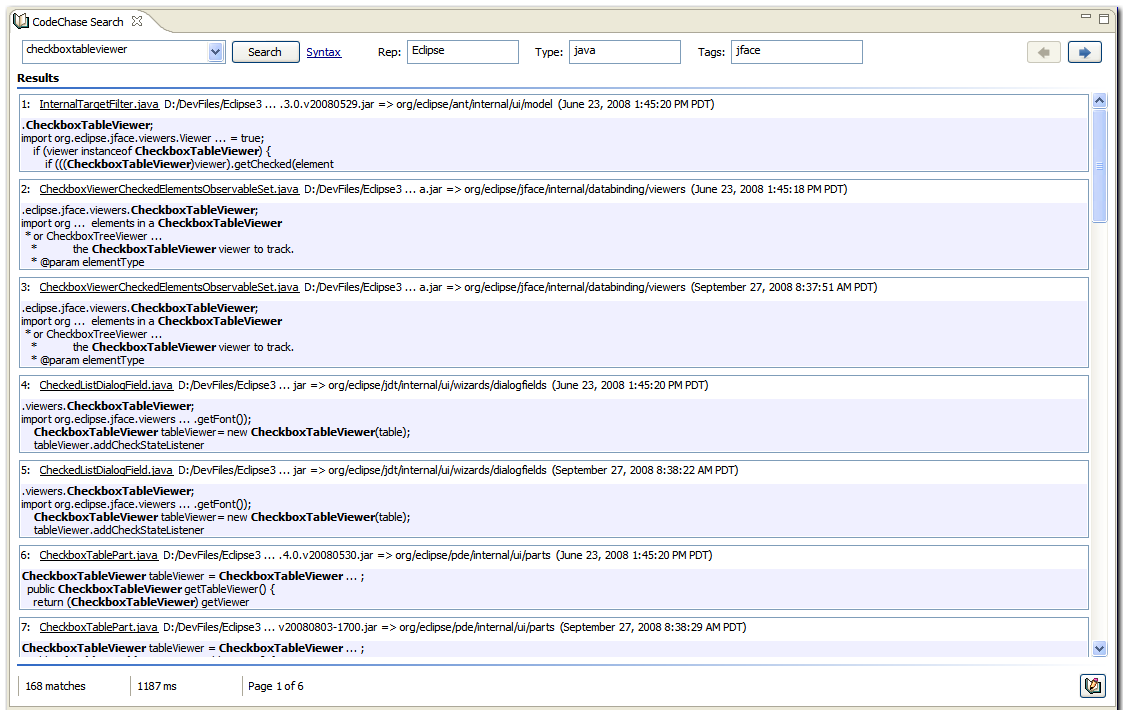
Opens from the CodeChase Search button on the main toolbar.
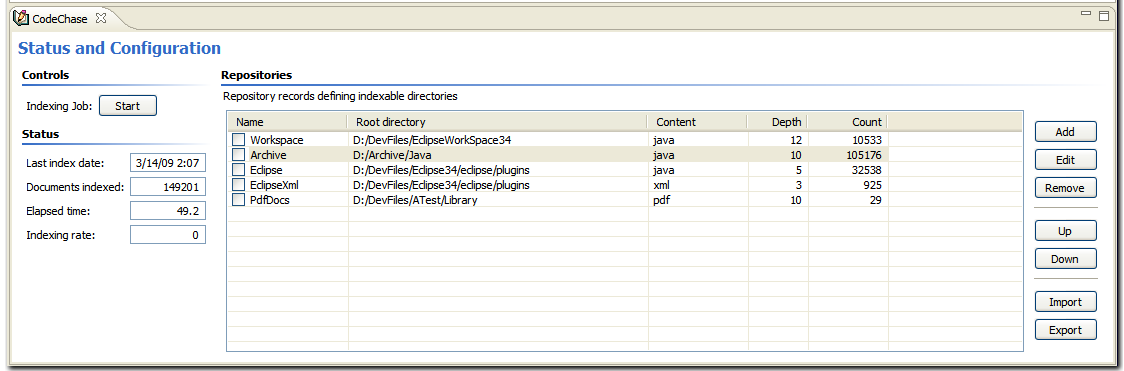
Use the Configuration Form button (bottom right in the Search Form) to open.
Setup
Initially, at least one repository must be defined and indexed. Multiple repositories can be defined. Default configuration and indexing options can be set in the CodeChase Preference Pages.
- Open the Repository Configuration form
- also available using Window->Show View->Other->Certiv Tools->CodeChase
Create one or more repository definitions
- a sample content repository specification can be imported to illustrate a possible repository setup
- the repository root identifies the content sub-directory tree to be indexed
- define multiple repositories to index disjoint content trees
- the inclusion and exclusion filters constrain the scope of the content indexed; preferably
- include files and filetypes
- exclude directory paths, files, and filetypes.
Index
- indexing is limited to the checked repositories
- none checked is the same as all checked
- push the Start button
Searching
Four search constraints fields are presented at the top of the search form. They are:
- free-form terms
- repository(s) select *
- content type select *
- auto-analyzed tags select *
* click in the fields to open selection popups.
The selection criteria defined by these fields are combined using a logical AND. Within the individual fields:
- search term combination is defined by the supported Lucene term modifiers and boolean operators (click the Syntax link for details)
- repository selections are combined with a logical OR *
- content type selections are combined with a logical OR *
- tag selections are combined with a logical AND **
* none checked is the same as all checked.
** none checked is the same as true.
Development State
- stable
- searches are fast
- indexing rates are highly dependent on disk speed and the ratio of indexable to non-indexable documents encountered in the index scan
- expect indexing speeds of 50 to 250 documents/sec
- the index job will appear to pause whenever it encounters a large number of consecutive non-indexable documents
- will only read into a single level of archives – ‘tar.gz’ is considered a single level
- retrieving content from tar-based archives is decidedly slow, as expected when accessing stream-oriented archives
Requirements
- Eclipse 4.5+ on Java 8 VM
License
Eclipse Public License v1.0