JDocEditor
Provides an Eclipse view-based WYSIWYG JavaDoc editor.
- WYSIWYG JavaDoc content editor seamlessly linked to the active JDT editor.
- comment editing is bidirectionally linked, in realtime.
- full complement of word processing functions for composing and revising JavaDoc content
- includes real-time JavaDoc spelling checker.
- new JavaDoc comment blocks can be automatically generated, updated, and repaired
- Class, constructor, and method signature types are hyper-linked to the full JavaDoc pages.
- has automatic access to the Eclipse platform JavaDoc.
- toolbar can be positioned above or below the view panes.
- pure SWT control implementation.
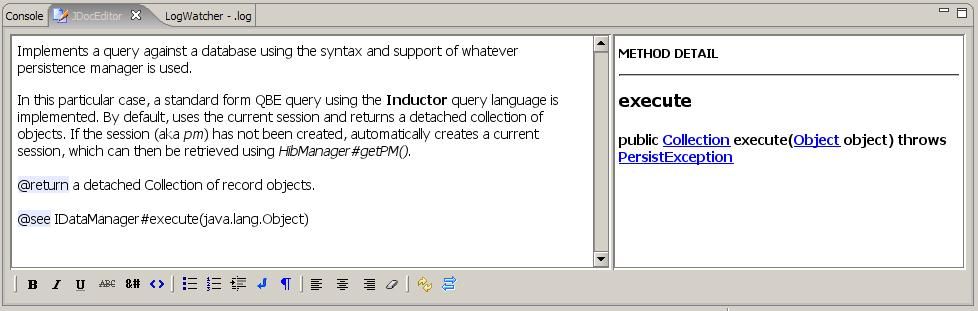
Screen Shot
Use
- Any valid selection event in the current, active JDT editor will automatically load the JDocEditor with the corresponding JavaDoc content. The Eclipse Content Outline View may also be used to navigate and load JDocEditor with content. The Outline View is not required to be open.
- Right-click menus provide comment correction, tag insertion and repair, and spelling correction options.
- Various shift and control key combinations, standard for the StyledText control, are available (Keystrokes).
Configuration
- To enable the spell checker, set the path to an OpenOffice.org spelling dictionary in the the JDocEditor preferences.
- English and Spanish dictionaries are included in the plugin jar and can be copied out to a convenient directory – the personal dictionary will be created in the same directory. For English, use the us_US.zip dictionary.
- To enable custom styling of the JDocEditor panes, set a path to an existing stylesheet in the the JDocEditor preferences.
- A default stylesheet (default.css) is included in the plugin jar. Just copy it out to a convenient directory and modify.
- To support Unicode, make sure the first body#font-family font is a Unicode font.
Subprojects
JDocEditor is built using a variety of subpackages. Custom packages include:
- StyledHtml – WYSIWYG Html extension of the SWT StyledText control
- CssQuery – pure Java implementation CSS query engine
- SwtSpell – SWT spell checker using OpenOffice dictionaries
Faq
Check the “JDocEditor Faq” for preference settings, answers to common problems, and other helpful tips.
Requirements
- Eclipse 4.5.2 on Java 8 VM
License
Eclipse Public License v1.0